LLM vs. SLM vs. FM: Choosing the Right AI Model for the Job
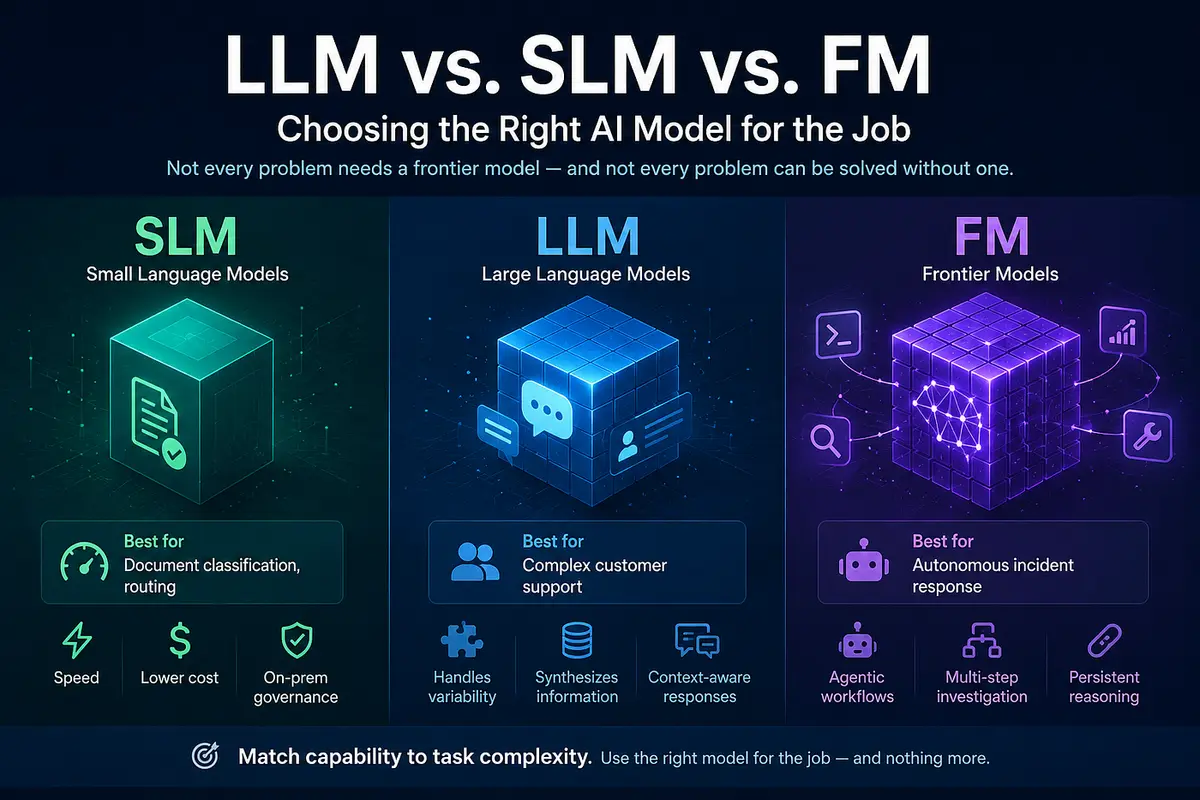
Not every problem needs a frontier model — and not every problem can be solved without one.
If you’ve spent any time building AI-powered products over the last year, you’ve probably noticed the model landscape has splintered into three distinct tiers: Large Language Models (LLMs), Small Language Models (SLMs), and Frontier Models (FMs). Each one is optimized for a different kind of problem, and picking the wrong tier is one of the most common — and most expensive — mistakes teams make when shipping AI features.
This article breaks down what separates these three categories, and more importantly, how to decide which one actually belongs in your architecture.
The Three Tiers, Defined
Small Language Models (SLMs) typically sit under 10 billion parameters. They’re not trying to know everything — they’re built to do one thing fast, cheaply, and reliably. Think of them as specialists rather than generalists.
Large Language Models (LLMs) are the generalists of the group, usually running into the tens of billions of parameters. They’re the workhorses most people think of when they hear “AI model” — capable of handling a wide range of tasks with strong reasoning and language understanding.
Frontier Models (FMs) sit at the top of the stack, often in the hundreds of billions of parameters, with deep native tool integration and the ability to hold complex reasoning chains together across multi-step tasks. These are the models built for the hardest, most open-ended problems.
The real strategic question isn’t “which model is best?” — it’s “which model is right for this specific use case?”
Where SLMs Shine: Document Classification and Routing
If your task is narrow and repetitive — like classifying incoming documents, tagging support tickets, or routing requests to the right team — an SLM is often the smarter choice. Three things make them ideal here:
- Speed. Smaller models mean faster inference, which matters when you’re processing high volumes.
- Lower cost. Fewer parameters translates directly into lower compute costs at scale.
- Data governance. Because SLMs are small enough to run on-premise, sensitive documents never have to leave your infrastructure — a major win for regulated industries like finance and healthcare.
Using a frontier model to classify a document as “invoice” vs. “contract” is like hiring a surgeon to put on a Band-Aid. It works, but you’re paying for far more capability than the task requires.
Where LLMs Shine: Complex Customer Support
Customer support is rarely a single-turn problem. A real support interaction often requires pulling together billing history, account configuration, and prior conversation context — then synthesizing all of it into a coherent, helpful answer.
This is where LLMs earn their keep. They’re strong enough to reason across multiple sources of information and flexible enough to handle the variability that comes with real human problems — problems that don’t fit neatly into a predefined category the way document routing does.
An SLM would struggle here because the problem space is too broad and nuanced. A frontier model would work, but it’s often overkill — and significantly more expensive — for a task that doesn’t require deep multi-step autonomous reasoning.
Where FMs Shine: Autonomous Incident Response
Now consider a much harder problem: an autonomous agent responsible for incident response — investigating an outage, correlating logs across systems, forming hypotheses, taking action, and adjusting its approach based on what it finds.
This is squarely frontier model territory. These tasks demand:
- Agentic workflows — the model isn’t just answering a question, it’s operating a multi-step process with tools.
- Complex, multi-step investigation — the model needs to explore, backtrack, and refine its understanding as new information comes in.
- Persistent reasoning chains — the ability to maintain context and logical continuity across an extended task, not just a single exchange.
This is the kind of problem where cutting corners with a smaller model doesn’t just underperform — it can actively produce the wrong conclusion during a high-stakes incident.
From Theory to Practice: Configuring and Running an SLM
Knowing when to reach for an SLM is only half the battle — actually standing one up is a fairly approachable project. Here’s what that looks like end to end.
1. Pick the right model
For classification/routing-style tasks, you rarely need the full 10B ceiling. Popular sub-10B options right now:
- Llama 3.2 (1B/3B) — Meta, strong tooling and community support
- Phi-3.5-mini (3.8B) — Microsoft, punches above its weight on reasoning
- Qwen2.5 (0.5B–7B) — efficient, strong multilingual support
- Gemma 2 (2B/9B) — Google, solid instruction-following
- Mistral 7B — strong general performance, permissive license
2. Choose a runtime
Option A — Ollama (fastest path to a working local API)
curl -fsSL https://ollama.com/install.sh | sh
ollama pull llama3.2:3b
ollama run llama3.2:3b
Ollama exposes a local REST API on localhost:11434 that any backend service can call directly.
Option B — llama.cpp (maximum control on constrained/CPU-only hardware)
git clone https://github.com/ggerganov/llama.cpp
cd llama.cpp && make
./llama-server -m model.gguf --port 8080
This is the route to take when squeezing every bit of latency and throughput out of limited hardware — for example, a single CPU-only container task with no GPU attached.
Option C — Hugging Face Transformers (best for fine-tuning/experimentation)
from transformers import AutoModelForCausalLM, AutoTokenizer
model = AutoModelForCausalLM.from_pretrained("microsoft/Phi-3.5-mini-instruct")
tokenizer = AutoTokenizer.from_pretrained("microsoft/Phi-3.5-mini-instruct")
3. Fine-tune with LoRA (optional, often worth it)
A general-purpose SLM prompted well will get you far, but a small amount of LoRA fine-tuning on a few hundred to a few thousand labeled examples usually makes a narrow task — like document classification — noticeably more reliable than prompting alone, and can outperform a much larger general model on that specific task.
from peft import LoraConfig, get_peft_model
lora_config = LoraConfig(
    r=16, lora_alpha=32,
    target_modules=["q_proj", "v_proj"],
    lora_dropout=0.05, task_type="CAUSAL_LM"
)
model = get_peft_model(model, lora_config)
# then train on your labeled dataset with Trainer / SFTTrainer from trl
4. Quantize before deploying
Quantization (e.g., Q4_K_M via llama.cpp) shrinks a model’s memory footprint by roughly 4x with a modest accuracy tradeoff — usually a good trade for narrow, well-defined tasks, and often the deciding factor in whether an SLM can run comfortably on modest infrastructure.
# Convert to GGUF and quantize with llama.cpp
python convert_hf_to_gguf.py ./my-finetuned-model --outfile model.gguf
./llama-quantize model.gguf model-q4.gguf Q4_K_M
5. Deploy as its own service
In a typical cloud setup, the SLM runs well as an independent containerized service:
- Package the inference server (Ollama or llama.cpp server) into a Docker image
- Deploy it as its own container service, sized appropriately for CPU-based inference
- Put it behind internal service discovery (not exposed to the public internet) so backend services can call it privately — keeping data inside the VPC and reinforcing the data-governance advantage that made SLMs attractive in the first place
- Define the service through infrastructure-as-code alongside your other services, with CPU-based autoscaling since SLM inference load correlates closely with CPU usage
A minimal example using Terraform against an ECS Fargate–style setup:
resource "aws_ecs_task_definition" "slm_inference" {
  family                   = "slm-classifier"
  requires_compatibilities = ["FARGATE"]
  cpu                      = "2048"
  memory                   = "4096"
  container_definitions = jsonencode([{
    name  = "slm-server"
    image = "${var.ecr_repo}:slm-latest"
    portMappings = [{ containerPort = 11434 }]
  }])
}
6. Call it from your application
Once deployed, calling the SLM is no different from calling any other internal microservice:
response = Faraday.post("http://slm-service.internal:11434/api/generate") do |req|
  req.headers["Content-Type"] = "application/json"
  req.body = { model: "classifier-v1", prompt: document_text, stream: false }.to_json
end
classification = JSON.parse(response.body)["response"]
A few practical tips worth building in from day one:
- Cache repeated classifications where possible — SLMs are cheap, but network round-trips aren’t free
- Add a confidence threshold and fall back to a human review queue or a larger LLM for edge cases the SLM is unsure about
- Monitor drift and retrain periodically as your document types or task distribution evolves
Configuring and Running an LLM
LLMs sit in a different operational category than SLMs. At tens of billions of parameters, self-hosting is possible but rarely the default choice for most teams — the more common (and often more practical) path is calling a hosted API, with self-hosting reserved for teams with specific cost, latency, or data-residency requirements at scale.
Option A — Hosted API (the common default)
For most production use cases — including something like complex customer support — calling a hosted LLM API is the fastest path to production and avoids owning GPU infrastructure entirely:
require "faraday"
response = Faraday.post("https://api.anthropic.com/v1/messages") do |req|
  req.headers["Content-Type"] = "application/json"
  req.headers["x-api-key"] = ENV["ANTHROPIC_API_KEY"]
  req.body = {
    model: "claude-sonnet-5",
    max_tokens: 1024,
    messages: [
      { role: "user", content: build_support_prompt(ticket, billing_history, account_config) }
    ]
  }.to_json
end
reply = JSON.parse(response.body)["content"].first["text"]
This approach scales elastically with demand, requires no infrastructure management, and gets you access to models that are continually improved by the provider — a meaningful advantage for a task like support triage where quality directly affects customer experience.
Option B — Self-hosted (for scale, cost control, or data residency)
If you’re operating at high enough volume that API costs become a bigger factor than engineering overhead, or you have strict requirements about where data is processed, self-hosting an open LLM (e.g., Llama 3.1 70B, Mixtral 8x22B) becomes worth evaluating. This is typically done with an inference server built for concurrent, high-throughput serving rather than the single-request tools used for SLMs:
pip install vllm
python -m vllm.entrypoints.openai.api_server \
  --model meta-llama/Llama-3.1-70B-Instruct \
  --tensor-parallel-size 4 \
  --port 8000
vllm (and similar serving frameworks like TGI) handle the batching, KV-cache management, and multi-GPU parallelism needed to serve a model this size efficiently — none of which matters at the SLM scale but becomes essential here.
Designing the LLM layer around synthesis, not classification
Since LLMs earn their keep by combining multiple sources of context, the more important design work is often on the application side rather than the model side:
- Retrieval — pull the right billing records, config data, and ticket history into the prompt before calling the model (RAG patterns apply directly here)
- Structured prompting — clearly separate the different data sources in the prompt so the model can reason across them distinctly rather than as one undifferentiated blob of text
- Conversation memory — persist relevant conversation state across turns so the model isn’t re-deriving context on every message
Configuring and Running a Frontier Model
Frontier models are almost always accessed via API rather than self-hosted — the hardware and engineering investment required to serve a hundreds-of-billions-parameter model at production quality is well beyond what almost any team would take on themselves. The real configuration work for FMs is less about infrastructure and more about orchestration: giving the model tools, structure, and the ability to operate across multiple steps.
1. Access the model via API
import anthropic
client = anthropic.Anthropic(api_key=os.environ["ANTHROPIC_API_KEY"])
response = client.messages.create(
    model="claude-opus-4-8",
    max_tokens=2048,
    tools=[log_query_tool, metrics_query_tool, runbook_lookup_tool, action_execute_tool],
    messages=[{"role": "user", "content": incident_description}]
)
2. Give it tools, not just a prompt
The defining feature of an FM use case like autonomous incident response is tool use — the model needs to actually query systems, not just reason about hypothetical data:
log_query_tool = {
    "name": "query_logs",
    "description": "Query application logs for a given service and time range",
    "input_schema": {
        "type": "object",
        "properties": {
            "service": {"type": "string"},
            "start_time": {"type": "string"},
            "query": {"type": "string"}
        },
        "required": ["service", "start_time", "query"]
    }
}
Each tool the model can call — log search, metrics lookup, runbook retrieval, remediation actions — becomes part of its available action space during the investigation.
3. Support multi-step, agentic execution
Unlike a single request/response call, agentic workflows require a loop: the model reasons, calls a tool, receives a result, and decides its next step — repeating until it reaches a conclusion or takes action:
messages = [{"role": "user", "content": incident_description}]while True:
response = client.messages.create(
model="claude-opus-4-8", max_tokens=2048,
tools=available_tools, messages=messages
)
if response.stop_reason != "tool_use":
break
tool_result = execute_tool(response) # run the actual log query, metrics call, etc.
messages.append({"role": "assistant", "content": response.content})
messages.append({"role": "user", "content": tool_result})
4. Add guardrails around autonomy
Because FMs in agentic workflows can take real actions, the engineering effort shifts toward safety and oversight:
- Human-in-the-loop checkpoints for higher-risk actions (restarting a service, rolling back a deploy)
- Action allowlists that constrain what the model is permitted to execute autonomously
- Full audit logging of every tool call and reasoning step, both for debugging and for post-incident review
System and Server Specifications
Hardware requirements scale directly with model size and quantization level. A useful rule of thumb: FP16 inference needs roughly 2GB of RAM per billion parameters, while Q4 quantization drops that to roughly 0.5–0.7GB per billion parameters — which is why quantization is often the difference between needing a beefy GPU box and running comfortably on a modest CPU instance.
Local development: a modern 4+ core CPU with 8–16GB RAM handles 1B–3B quantized models comfortably, no GPU required.
Production, CPU-only: small quantized models (1B–7B) run well on modest container specs — roughly 1–2 vCPU and 2–8GB RAM depending on model size and throughput needs. This is a realistic pattern precisely because SLMs are small; it wouldn’t hold up for a 70B+ model.
Production, GPU-backed: if CPU inference doesn’t meet latency or throughput targets, a single mid-tier GPU (16–24GB VRAM class) comfortably handles models up to 9B, with room for concurrent requests.
Fine-tuning: LoRA fine-tuning is far lighter than full fine-tuning — a single mid-tier GPU (16–24GB VRAM) is typically sufficient for 7B-class models, whereas full fine-tuning would require substantially more (40GB+ VRAM), which is usually unnecessary for narrow, task-specific SLMs.
Taken together, the appeal of SLMs isn’t just architectural — it’s economic. The same task that might require a large, GPU-heavy footprint for a bigger model can often run on lightweight, CPU-friendly infrastructure once you drop down to the right SLM, quantized appropriately for the job.
LLM and FM infrastructure: a different equation entirely
SLMs are the one tier where owning the hardware conversation makes sense for most teams. LLMs and FMs flip that equation:
If you do self-host an LLM (Option B above), plan around multi-GPU nodes rather than single-instance specs — a 70B model typically needs 4x GPUs with 24GB+ VRAM each (e.g., 4x A10G or A100) just to fit the weights, before accounting for the KV-cache overhead of concurrent requests. This is a materially larger commitment than anything in the SLM tier, which is exactly why most teams default to an API for this range unless volume truly justifies it.
For FMs, there’s effectively no “server spec” to plan for on your side — the relevant capacity planning shifts to API rate limits, context window budget (how much log/metrics data you can feed into a single investigation), and the number of agentic steps a workflow is allowed to take before it must stop and escalate to a human.
The Real Takeaway: Match Capability to Task
The pattern across all three tiers is consistent: capability should scale with task complexity, not the other way around.
Model Type Parameter Range Best For Key Advantage SLM < 10B Document classification, routing Speed, cost, on-prem governance LLM Tens of billions Complex customer support Synthesizing varied information FM Hundreds of billions Autonomous incident response Agentic, multi-step reasoning
Reaching for a frontier model by default feels safe, but it’s often a costly habit — both in dollars and in latency. On the flip side, forcing a small model to handle open-ended, multi-step reasoning will produce brittle, unreliable results.
The teams that build the most efficient AI systems aren’t the ones using the biggest model everywhere. They’re the ones who’ve mapped their use cases honestly against what each tier is actually built to do — and who aren’t afraid to mix and match SLMs, LLMs, and FMs within the same product depending on what each individual task demands.
Choose the model for the job, not the job for the model.
About the Author
I’m a full-stack developer passionate about leveraging AI to enhance developer productivity. When I’m not coding, I’m exploring new ways to integrate AI into development workflows.
Connect with me:
- GitHub: @iamqasimali
- Twitter/X: QasimA6
- LinkedIn: https://www.linkedin.com/in/qasim-ali-zahid/
If you found this article helpful, please clap 👏 and share it with your fellow developers. Have questions? Drop them in the comments below!
Tags: #AI #LLM #SLM #FrontierModels #MachineLearning #FullStack #DevOps #Claude #Automation #AWS #Terraform #Docker #Productivity
Written by Qasimali
Technology enthusiast and developer sharing insights on web development, AI, and modern software solutions.
View more articles →